Topic Cluster Strategy: How to Build One That Works
Learn how a topic cluster strategy groups related subjects into a coherent content plan, with pillar pages, supporting posts and internal links explained.
You publish often, and the feed still feels quiet. Say you are a consultant posting three times a week on LinkedIn. One week it is pricing. The next it is a client win. After that, a tool review. A year later, search visits and inquiries have barely moved, because none of those posts point to the others.
Table of Contents
- Why Scattered Posts Stop Adding Up
- The Pillar, Cluster and Link Structure
- Why Search Engines Reward Connected Coverage
- How to Build Your First Cluster Step by Step
- One Expertise Theme Turned Into a Cluster
- Cluster Health Metrics and Warning Signs
- Decide Which Cluster Pages to Publish Next
Why Scattered Posts Stop Adding Up
Each post starts from zero. A reader who liked the pricing note has no path to the lesson that would make the next hire easier. A search engine sees three unrelated pages, not one body of expertise. Nothing accumulates.
A topic cluster strategy is a simple choice. Pick one central theme, publish a central page on it, publish focused pages on the related questions, and connect them all with links.
Think of a library. If every book sits on its own shelf with no catalog, a visitor can only find a title they already know. A catalog groups books by subject and points from each book to its neighbors. The books did not get smarter. The paths between them did.
You will need a clear page structure, a reason search systems care about those paths, a build sequence you can keep up, a worked example, a way to judge the group, and a rule for what to leave unpublished.
A cluster is a planning tool for a theme, not a count of pages.
The Pillar, Cluster and Link Structure
Three page roles do different jobs. The pillar page covers the whole theme at overview depth and links to every cluster page. A cluster page answers one narrower question in depth and links back to the pillar. A supporting post, such as an example, a lesson, or a short angle, feeds one cluster page and links to it.
| Page role | Reader question it answers | Links it carries |
|---|---|---|
| Pillar page | What is this theme and where do I start? | Links to every cluster page |
| Cluster page | How do I handle this specific question in depth? | Links back to the pillar and to one genuinely related cluster page |
| Supporting post | What example, lesson or angle supports this question? | Links to its cluster page |
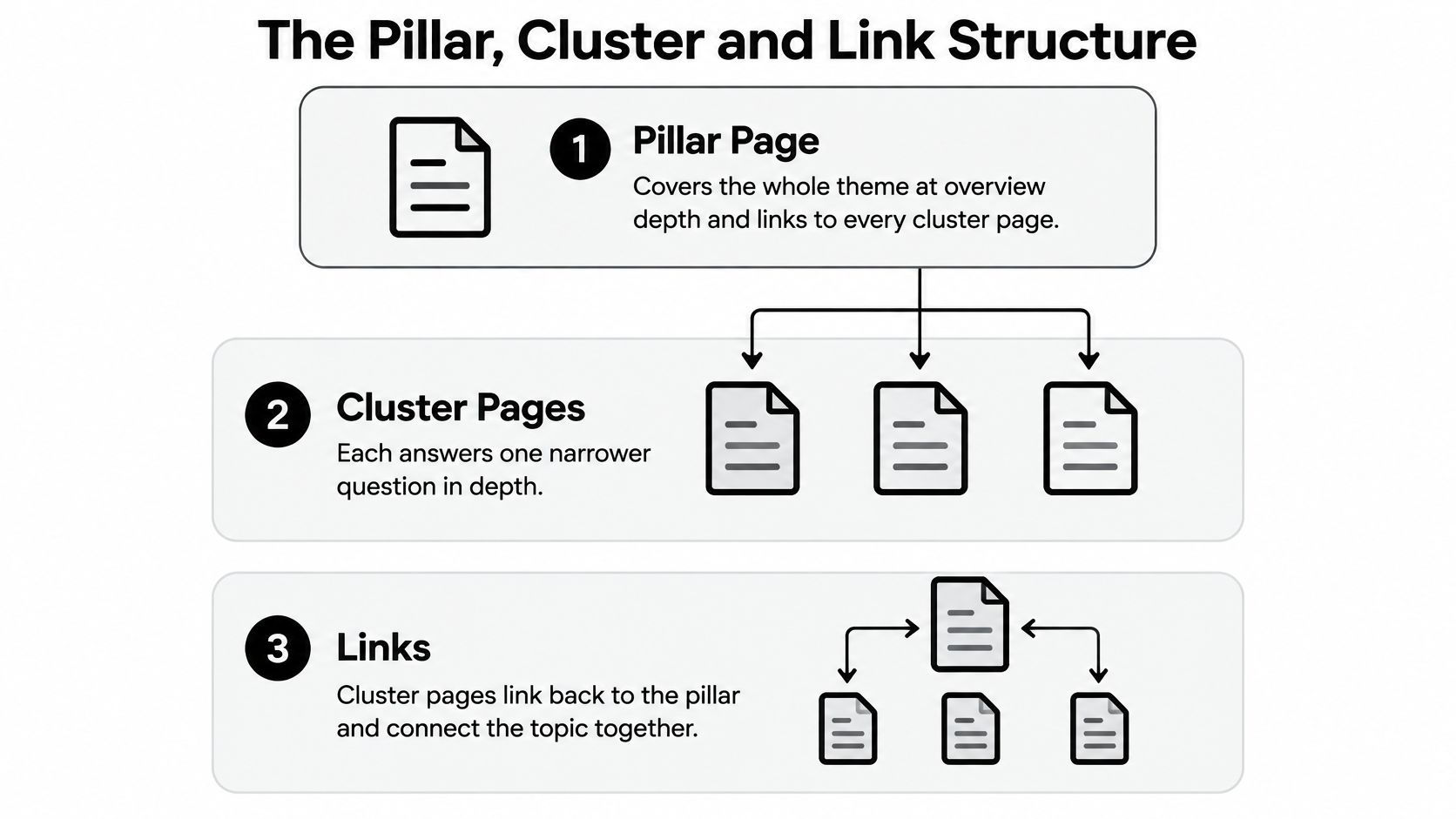
The link map
Treat the cluster as an explicit internal-link graph. The pillar reaches every focused page. Every focused page reaches the pillar. A cross-link between two cluster pages appears only when a reader would want that next step. A page about screening calls can point to the interview page. It should not point to salary bands just to fill a quota.
Google's crawling documentation recommends that every page worth indexing receive at least one internal link, and it advises placing important pages within several clicks of the homepage. Links help crawlers find pages, and the anchor text plus the sentence around it tells both readers and crawlers what the destination is about.
Orphans and weak anchors
An orphan page has no internal links pointing to it. Readers never stumble on it, and crawlers have a harder time finding it. Weak anchors waste the same path. Click here says nothing. Content calendar template says exactly which job the next page does.
Practical rule: Pick any cluster page and confirm you can reach it from the pillar in one click, then return to the pillar from that page.
Build one topic map per theme. Give each subtopic a distinct search or audience intent. Then audit for orphans, two URLs fighting over the same question, and anchors that could describe any page on the site. The map supports relevance and findability. It does not, by itself, decide rankings.
Why Search Engines Reward Connected Coverage
Search used to reward a page that repeated a short phrase often enough. That bargain changed in a short stretch of updates, and the reason to group pages changed with it.
SiteCove's guide to Hummingbird places Google's Hummingbird algorithm in August 2013, when matching shifted from individual keywords toward the meaning and intent of complete search phrases. Isolated pages aimed at tiny keyword variants stopped looking like a smart plan.
RankBrain followed and added machine learning that connected unfamiliar queries with related prior searches. Intent and the relationships between ideas mattered more than an exact string of words.
Engines learned to read a subject the way a person does, as a set of related questions rather than a bag of terms. A broad pillar, focused cluster pages, and links among them match that way of reading. A pile of disconnected articles, or a year of unrelated social posts, does not.
The ranking boost that isn't there
A cluster does not earn an automatic ranking boost. Connection helps relevance and discovery. Relevance, quality, authority, technical performance, and user satisfaction still decide what shows up. The cluster works like a portfolio. Structure gives each page context, yet every page still has to earn its slot, and some will eventually deserve merging or retiring rather than a permanent place on the map.
A connected set of pages is a subject system, not a shortcut past weak writing.
For a business, the useful result is that expertise becomes something narrower posts can draw from. A LinkedIn theme on content planning can anchor posts about calendars, post hooks, and audience research. Each post gains context from the theme it belongs to, instead of introducing the author from scratch.
How to Build Your First Cluster Step by Step
Build one cluster before you sketch five. The sequence below keeps the theme small enough to finish, and each step names the slip that usually breaks it.
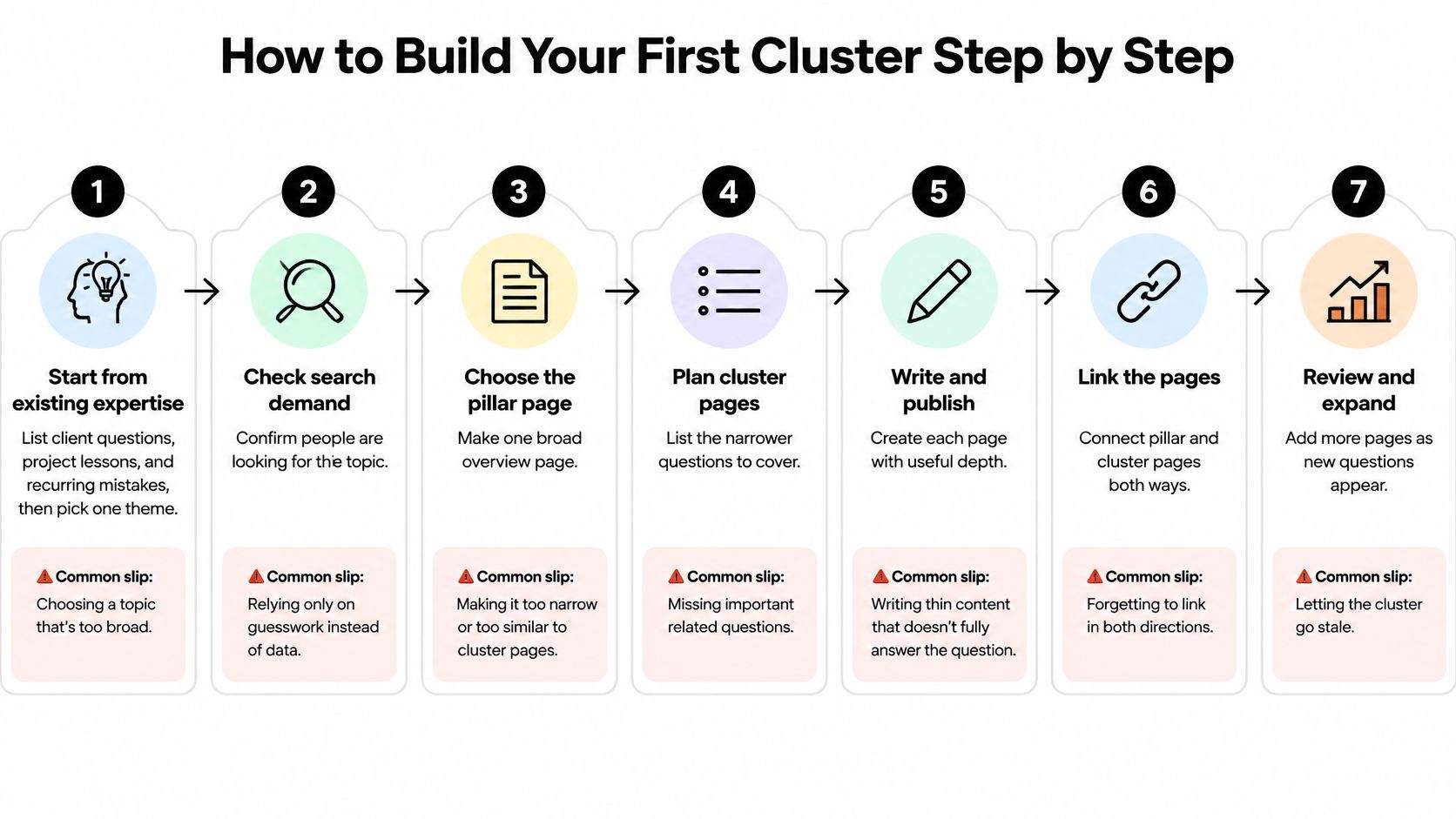
From what you know to a publishing order
- Start from existing expertise. List the questions clients ask, the lessons from real projects, and the mistakes that keep recurring, then pick one theme you can speak to with authority, because the slip is choosing a theme you only follow rather than practice.
- Define the pillar. Write one sentence that names the theme and the reader it serves, and plan the pillar to cover the whole theme at overview depth, because the slip is writing a pillar that is really one long answer to a single question.
- Expand into subtopics. List six to ten narrower questions and keep only those with a distinct reader task, so each cluster page has one search or audience intent, because the slip is keeping near-duplicate questions that will compete with each other.
- Set a cadence you can sustain. Put the kept pages into an order and a rhythm you can publish, and a simple content workflow diagram helps you see where drafting, review, and posting sit, because the slip is planning more pages than you can maintain.
Links, the hub, and the first review
- Map the links before you publish. The pillar links to every cluster page and each cluster page links back, using the roles already set, because the slip is adding links only after publishing, which leaves orphan pages.
- Publish the pillar first. The hub has to exist before the spokes point at it, because the slip is publishing spokes that link to a hub that does not yet exist.
- Review the cluster as a group. After a set period, note which subtopics earn visits and time on the page, and feed those findings into the next theme, because the slip is judging single pages instead of the cluster as a whole.
Why the slips matter more than the list
Steps 1 and 3 protect the theme from vanity topics. If you cannot answer the question from work you have done, the page will read like a summary of someone else's guide. If two questions share the same reader task, publish one page and fold the second angle into it.
Steps 5 and 6 protect discovery. A spoke that links to a missing hub sends readers and crawlers to a dead end. A hub published first gives every later page a home on day one.
Step 4 is the one people skip when they are excited. Six strong pages on a quarterly rhythm beat twelve drafts that never leave a doc. Step 7 closes the loop. The subtopics people use become the seed list for the next theme, and the quiet ones become candidates to merge or retire.
One Expertise Theme Turned Into a Cluster
A freelance HR consultant who advises small companies picks one theme she practices every month: hiring for small teams. She is not trying to own all of HR. She is trying to be the clearest guide for founders who have never hired before.
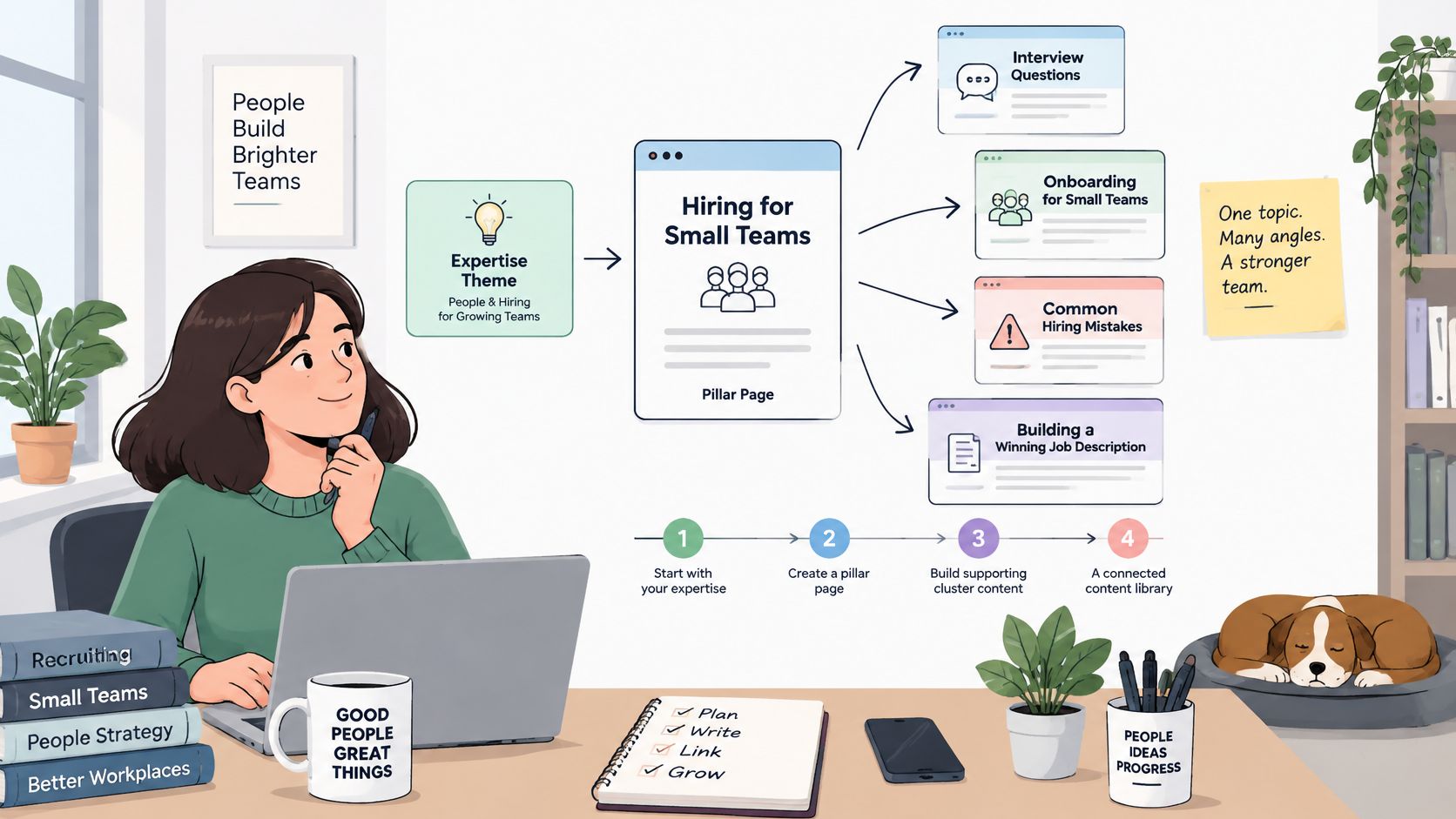
The pillar and the four questions
Her pillar is a guide to hiring for teams under 50 people. It walks the full process at overview depth, from the role definition to the first ninety days, and it links to each cluster page where that step gets a full treatment.
The cluster pages each own one task:
- Writing a job description that attracts the right applicants
- Running a 30-minute screening call
- Structuring a first-hire interview
- Onboarding a first employee in the first 90 days
Supporting posts come from her own files. One is a lesson from a hire that failed within two months. One is a checklist for reference calls. One is a short take on salary bands for early roles. Each supporting post links to its cluster page. Each cluster page links to the pillar and to one neighboring page a reader would open next. The job-description page points to the screening call. The screening page points to the interview. The interview page points to onboarding.
| Page | Role | Links it carries |
|---|---|---|
| Writing a job description that attracts the right applicants | Cluster page | Pillar and one neighbouring cluster page |
| Running a 30-minute screening call | Cluster page | Pillar and one neighbouring cluster page |
| Structuring a first-hire interview | Cluster page | Pillar and one neighbouring cluster page |
| Lesson from a hire that failed within two months | Supporting post | Its cluster page |
| Reference call checklist | Supporting post | Its cluster page |
| Salary bands for early roles | Supporting post | Its cluster page |
A reader searching for a job description template lands on that cluster page, finds the pillar in one click, and can follow the trail through the rest of the theme without starting a new search.
The short video below shows the same hub-and-spoke idea as a sketch, which is useful if you want to see the paths before you name your own pages.
She left out a post on general employment law. That subject belongs to a theme she does not cover, and a thin legal overview would weaken the hiring cluster rather than complete it.
Cluster Health Metrics and Warning Signs
Judge the cluster as a portfolio. A single page that ranks while the rest sit idle is not a healthy theme.
| Measure | What it shows | Warning sign |
|---|---|---|
| Total sessions across the cluster | Whether the theme draws visitors as a group | No growth across several review cycles |
| Average session length | Whether readers stay to explore related pages | Short visits on every cluster page |
| Bounce rate | Whether a page delivers what its search query promised | High bounce on the pillar page |
| Internal link clicks from pillar to cluster | Whether readers move through the structure | Few clicks, so cluster pages sit unused |
The topic-cluster glossary at AI Search Glossary notes that HubSpot's content-strategy documentation treats total sessions, average session length, and bounce rate as useful measures for content attached to a topic. Internal link clicks are the fourth measure, because they show whether the structure itself is doing work.
Read the four measures together
Strong sessions with short visits mean the pages answer a narrow query and then stop. The fix is usually a clearer next step inside the page, not more keywords. High bounce on the pillar means the overview does not match the query that brought people in. Either the title overpromises, or the opening never states what the theme covers.
Few clicks from the pillar to the cluster pages mean the links are buried, vague, or placed where nobody is still reading. Move them next to the sentence that introduces each subtopic, and use anchors that name the task.
When clicks fall even if the pages are sound
Visibility and traffic can split. Technology.org's report on AI search and publisher traffic cites a comparison in which traditional-result click-through was 8% when Google displayed an AI summary and 15% when it did not. A page can be seen more often and visited less often.
Check whether your pages are cited in AI answers, and whether the people who still arrive come back or convert.
Do that check on a fixed schedule, and compare each cluster with its own history. Another site's traffic numbers will not tell you whether your hiring guide got better this quarter.
Decide Which Cluster Pages to Publish Next
A finished map is not the goal. Before you draft the next cluster page, ask three questions. Does it answer a distinct task a real reader has? Does that audience matter to the business? Does it add evidence or expertise the site does not already hold?
| Situation | Action |
|---|---|
| Distinct reader task with real demand | Publish as its own cluster page |
| Same question as an existing page | Merge the new material into that page |
| No new example, evidence or expertise | Leave it unpublished |
| Intent has shifted or engagement keeps falling | Refresh the page, or retire it and redirect readers |
How many pages are enough
A cluster is complete when the candidates that pass the test cover the theme. That is often fewer than the six to ten subtopics on the first list. Add a page only when a new question passes the same test. Two spokes that share a task should become one page. A cluster whose questions no longer match what people search for should be refreshed, or retired with a redirect so old links still land somewhere useful.
DroidCrunch's content gap analysis guide makes the limit plain. Gap methods can find missing subtopics without proving that each one deserves a standalone URL, and competitors may rank for topics an organization's audience does not need. Publishing those gaps to "complete the map" creates overlap, cannibalization, and pages you must keep updating.
A week-sized next step
Review each cluster on the same schedule you use for the health measures. Then do one small planning pass this week. Pick one theme from your own expertise, sketch a pillar and five cluster pages, and run the three questions on each title before you write a word.
In the planning step, PostPilot brings topics together in a content plan that makes the next step clear. The PostPilot demo shows suggestions meant for use as inspiration, not as a replacement for your knowledge or editorial judgment. You still decide which page gets published, which angle gets merged, and which idea stays in the notebook.
PostToGo is built for people who already have the expertise and need a clearer way to turn it into a LinkedIn theme, a set of angles, and a posting rhythm. A topic cluster strategy gives that work a home, so each post points back to a subject you can keep building. Visit PostToGo and try the demo to see how ideation, planning, and scheduling sit in one workflow.